


New article
Recently updated
Asset Types

Audience: Risk Administrators
Asset types are a way of grouping assets by name and description. An attribute of a Risk, for analysis, reporting or management information purposes. You only need to choose one of them to associate it with a risk record. This displays as assets under threat under a risk record.
Creating Asset Types
- To create an Asset Types, select Risk Administration | Asset Types. The Asset Types list screen will be displayed similar to this:

- Select the New icon to the right of the Asset Types header bar. The Asset Type list screen will expand similar to this:

Note: You may have to use the scroll bar at the right-hand side of the screen to reveal the Asset Details screen.
- Complete the mandatory Name and Description fields
- The Owner defaults to the User creating the record. You may also have a Group Owner.
- Select the Save icon to the right of the Asset Details header bar.
Amending Asset Types
- To Modify an Asset Type, select Risk Administration | Asset Types. The Asset Types list screen will be displayed similar to this:
- Select the Asset Type you wish to modify by selecting anywhere in the record row and use the scroll bar to the right of the screen to reveal the Asset Details screen similar to this:
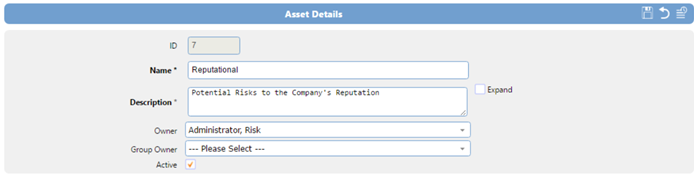
Note: You may have to use the scroll bar at the right-hand side of the screen to reveal the Asset Details screen.
- Make your changes and select the Save icon to the right of the Asset Details header bar.