New article
Recently updated
Creating and Managing Likelihoods

Audience: Risk Administrators
The likelihood of a Risk or threat happening within a specified time period measured in percentage terms. This could be estimated or assessed in qualitative terms (say high, medium, low) before conversion to a numerical value.
As part of calculating risk alerts, the likelihood of a certain risk occurring needs to be determined. To increase efficiency, reliability and repeatability these can be pre-set and categorised into Likelihood types.
Creating Likelihoods and Likelihood Types
- To create or modify Likelihoods use the Risk Administration | Likelihoods entry point. This will reveal a list of Likelihoods and Likelihood Types already defined. The screen form will appear similar to the following:
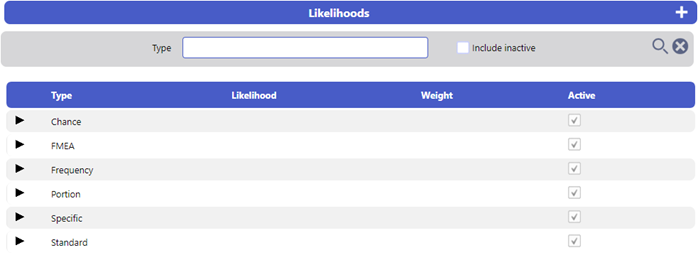
The list shows the Likelihood Types. To reveal the specific Likelihoods within each type, select the expand icon in the far left of the relevant row in the list.
- To create a new Likelihood Type, select the Add New icon.

- Complete the mandatory Title and select the Save icon to the right of the screen header bar. This will refresh the screen to reveal additional options:

- To create a new Likelihood, select the Add New icon in the Likelihood Type Details screen. This will reveal a new screen, similar to below:
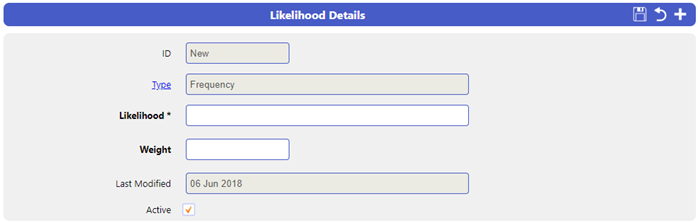
- Give the Likelihood a Title and a Weight
Note: The Weight signifies the level of Likelihood and is used to calculate the Risk Score
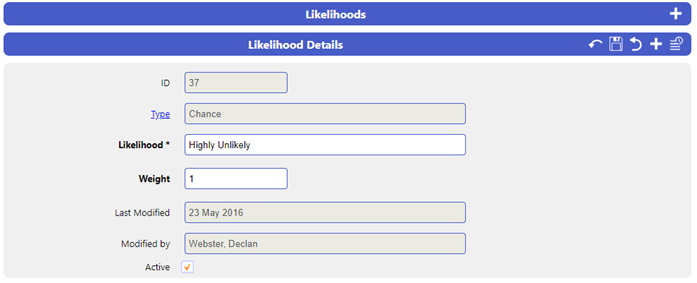
Amending Existing Likelihoods
- To modify a Likelihood or Likelihood Type, select the relevant row of the list. This will display the details of the Likelihood or Likelihood Type.
- Change any details wished and then select the Save icon.