


New article
Recently updated
Detectabilities

Audience: Risk Administrators
A measure of the visibility of a threat – i.e. to what extent it can be predicted or, from the opposite point of view, is hidden.
As part of a 3D risk alert calculation, Detectabilities can also be set as a measure of the visibility of a threat. To increase efficiency, reliability and repeatability these can be pre-set and categorised into Detectability Sets.
Enabling Detectabilities
In order to use Detectabilities as a part of your Risk Assessment process, you may have to first enable them within the system. To do so direct to Risk Administration | Settings and select the Enable Detectabilities checkbox. You must also define the maximum value for a Detectability, as shown in the Settings section of this user guide.
Cretaing Detectabilities and Detectability Sets
- To create or modify Detectabilities use the Risk Administration | Detectabilities entry point. This will reveal a list of already defined Detectabilities. The screen form will appear similar to below:
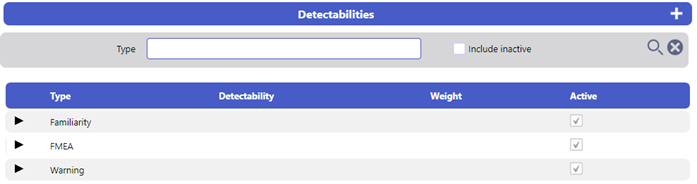
- To create a new Detectability Type, select the New icon. This will reveal a blank Detectabilities Type screen, similar to below:

- Complete the fields in that area. There must be a Title. Select the Save icon. The newly created Detectability Type will be added to the Detectabilities list

- To create a new Detectability, select the relevant Detectability Type then select the Add New icon in the Detectability Type Header. This will reveal a details window similar to below.
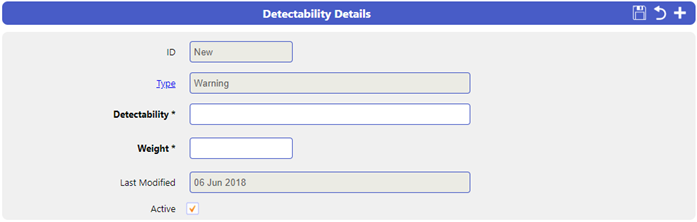
- Give the Detectability a Title and a Weight
Note: The Weight signifies the level of Detectability and can be used to calculate the Risk Score
- Select Save to confirm
Amending Existing Detectabilities and Detectability Sets
- To modify a Detectability, select the relevant row of the list, this will display the details of the Detectability or Detectability Set in a populated details screen form at the bottom of the list. Note that the arrow icon is pointing upwards signifying that the details shown are for a Detectability. Change any details wished and then select the Save icon.
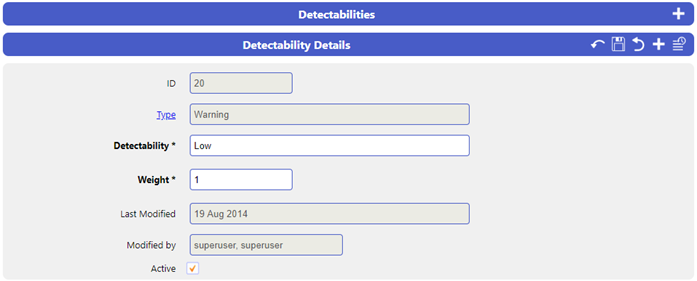
- To modify a Detectability Type, select the relevant row . This will reveal the Detectability Type details screen, similar to below:

- Amend any details required
- Select the Save icon to confirm